
Real-Time Vehicle Occupancy Rates and Tracking
An empty seat is the earliest sign that the plan has broken down. Catching a drop within the week is far cheaper than seeing it on the monthly invoice.
Definition
What is real-time vehicle occupancy tracking?
Real-time vehicle occupancy tracking is an operations monitoring solution that follows the occupancy rate of every vehicle and every trip stop by stop. Operations and administrative teams that manage the shuttle plan use it to see whether the plan still holds in the field.
The solution runs in the Live Operations Console inside vitaRoute and shows the expected passenger count next to the actual passenger count. Recurring patterns, such as stops that are never served and employees who have stopped using the shuttle, are drawn from the same data.
The problem
The plan breaks down, the vehicle runs the same route
A shuttle plan is correct on the day it is set up. Then employees join, leave, change shifts or go on leave, and the plan stays the same. The vehicle runs the same route again in the morning; the number of passengers inside quietly shrinks.
This decline is usually noticed in the monthly cost table, that is, weeks after the fact. By then the money for the trips that ran empty has already been paid. Every empty seat is written onto the invoice as a cost nobody used.
That is why manual monitoring is not enough. Asking drivers or administrative staff gives an idea only when someone happens to be paying attention; it does not say, in a regular and comparable way, which stop has emptied out or which employee has stopped using the shuttle. For that, occupancy has to be recorded automatically for every trip and every stop.
The solution
Occupancy is monitored while the trip is running
The Live Operations Console shows the expected and actual passenger counts side by side, stop by stop, for every trip. While the vehicle is moving, the occupancy rate updates in real time.
The system also flags recurring patterns separately: stops that are never served, points where nobody has boarded for months and employees who have stopped using the shuttle turn into alerts on their own.
As a result, you do not wait for month end to look at the plan. Which vehicle is running half full, which stop has emptied out and which way the trend is heading are in your hands on a weekly basis.
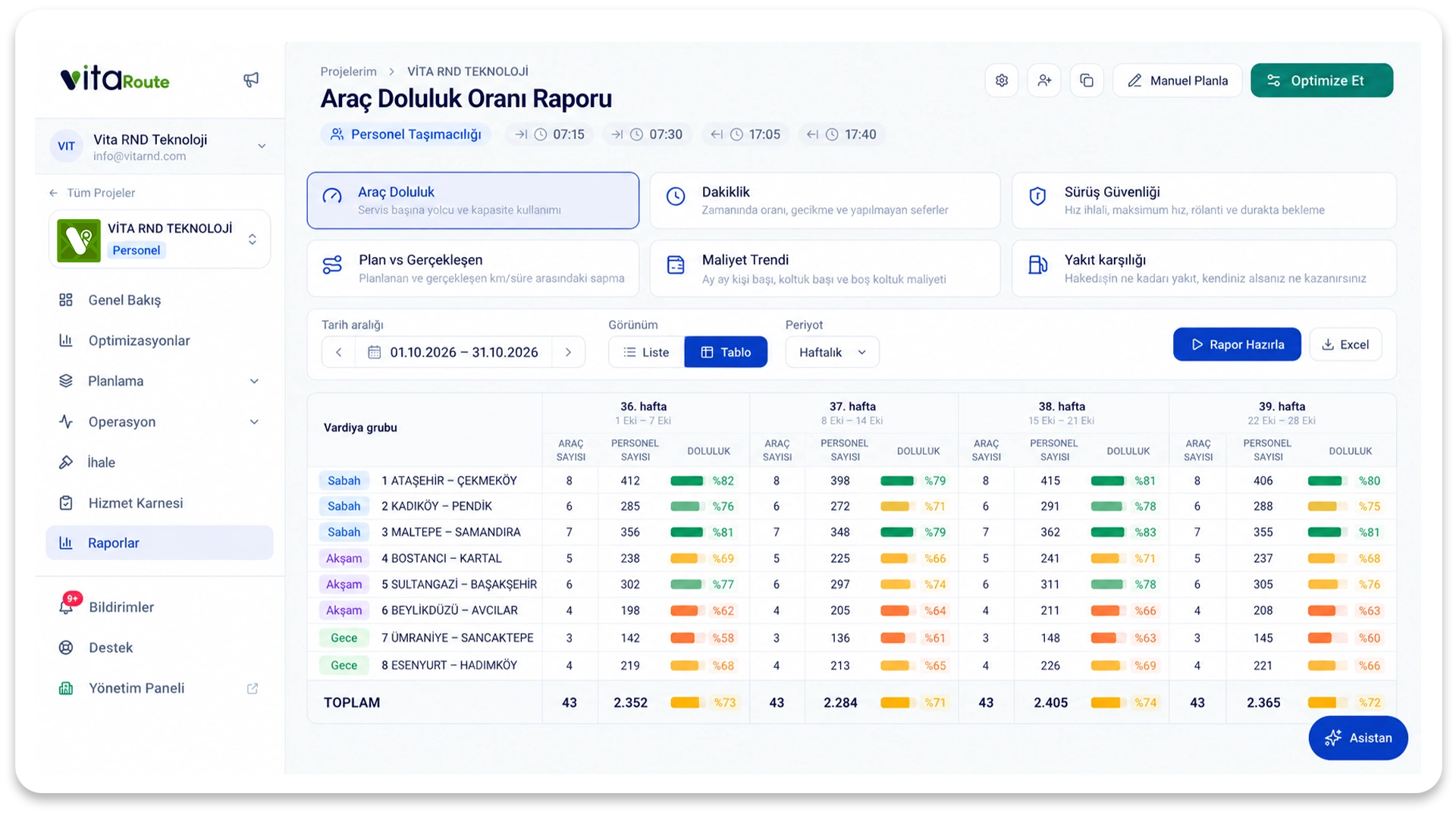
What does it cover?
Real-Time Vehicle Occupancy Rates and Tracking
Real-time occupancy rate by vehicle and trip
Expected versus actual comparison at stop level
Alert for employees not using the shuttle
Detection of stops that are never served
Weekly occupancy trend
Frequently asked questions
While the vehicle is moving, the occupancy rate is updated in real time and monitored in the Live Operations Console. The expected and actual passenger counts are shown side by side by trip and by stop.
Explore
Other solutions
See your first plan for Real-Time Vehicle Occupancy Rates and Tracking in minutes
Upload your employee list, define your stops and shift times, and see your first plan in minutes.